
Light Mode


Named to the Inc. 5000 list of America’s fastest-growing private companies six years in a row (2017–2022).
Investopedia: Best Short Term Stock Screener, 2024
The short answer: StocksToTrade bundles a scanner with lessons, so choose based on which half you want to replace. For a free live Trading Room, Channel Bar presets and more tools as you improve, Trade Ideas. For a real-time scanner you configure, Scanz. For news, Benzinga Pro. For charts, TradingView. Trade Ideas makes one of the tools on this page.
This page is on Trade Ideas' own website. See our Trade Ideas vs StocksToTrade page for a head-to-head view.
StocksToTrade is software for day traders. It ships with pre-built screeners and a library of training.
Level 1 real-time data comes with it, and the paper trading account runs on the same feed. StocksToTrade University adds videos and support.
If you trade small caps and penny stocks and want lessons and scans on one bill, it is a neat bundle.
See Trade Ideas vs StocksToTrade for a feature-by-feature view.
Each StocksToTrade alternative faced the same six tests. Our sources are in How we checked.
| Tool | Replaces which part of StocksToTrade | Real-time data | Backtesting | AI | List price | Best for |
|---|---|---|---|---|---|---|
| Trade Ideas | Training-plus-scanner role | Yes. Live market data on TI Standard (Core) and TI Premium (Apex) alike | OddsMaker, no code (TI Premium) | Holly AI Signals (TI Premium). Holly AI Assistant (each TI Pro plan) | TI Standard: $127 a month / $1,068 a year. TI Premium: $254 a month / $2,136 a year | A free Trading Room and Channel Bar presets |
| Scanz | Configurable real-time scanner | Yes, all plans | Not listed | Not listed | Starter $89, Pro $199, Ultra $999 a month | Fixed playbook scanners |
| Benzinga Pro | News plus scanner on Essential | Real-time quotes on paid plans | Not listed | Benzinga AI (Essential) | Basic $37 to Essential $197 a month | News-driven traders |
| TradingView | Charts | Screener auto-refresh on paid plans | Strategy backtesting; Bar Replay | AI screener requests | Basic $0; paid plans from $12.95/mo billed annually | Chart-first traders |
| TC2000 | Charts and scans | Real-time scanning on Premium | Not listed | Not listed | Basic $24.99 to Premium+ $99.99/mo | Budget charting |
| Day Trade Dash | 24 preset scanners | Real-time data included | Not listed | Not listed | $197/mo, or $147 for Warrior members | Ross Cameron presets |
Use a sideways swipe to see the full table.
We write "Not listed" when a feature wasn't on the vendor's own pages.
Best for a free Trading Room, Channel Bar presets and room to grow
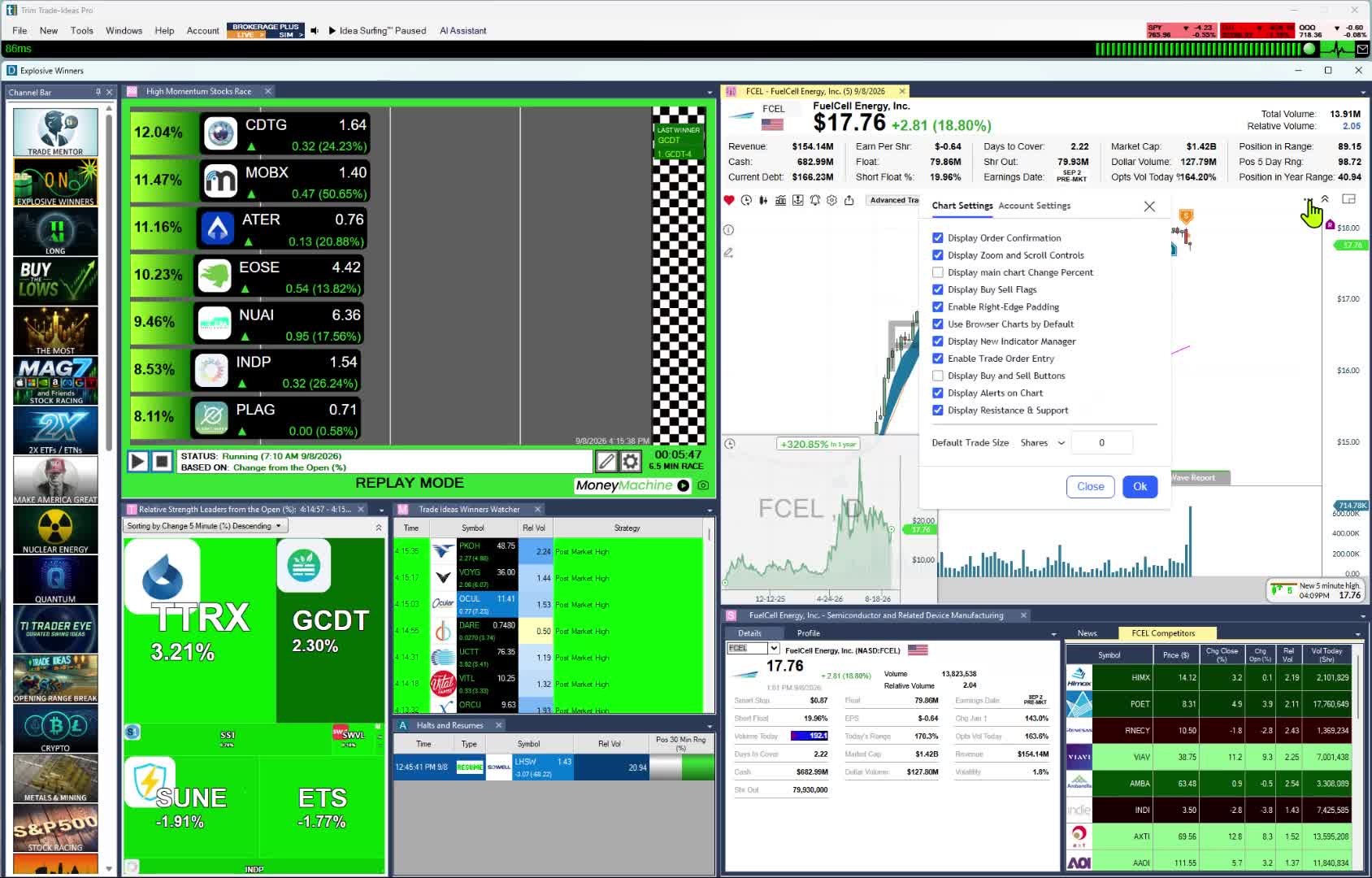
StocksToTrade sells paid rooms as add-ons. The Trade Ideas Trading Room is free. The software needs no setup, because the Channel Bar's ready-made channels are in every plan. When you are ready for more, TI Premium adds Holly AI Signals, OddsMaker and the Money Machine auto-trader.
Replaces: The training-plus-scanner bundle, with a free live room and tools you can grow into.
Your own small-cap rules. Instead of a fixed list, you pick from 310 alerts and 249 filters, all explained in our help. Any alert works with any mix of filters; set a min, a max or both on price, float or relative volume. 191 alerts carry an extra setting of their own, such as the dollar size of the move on Running Up Now. For the open there are opening range breakout and breakdown alerts on 1, 2, 5, 10, 15, 30 and 60 minute ranges (the 2-minute breakout, for one), and intraday pattern alerts such as the 5-minute 1-2-3 buy signal and the 5-minute NR7, where you can require two or more NR7 bars in a row. Taken together, the scans you could assemble are effectively unlimited.
Worth knowing: The coverage is US-listed stocks. Small-cap traders who want AI signals and backtests should budget for TI Premium, which holds Holly AI Signals, OddsMaker and Money Machine. Windows users get TI Pro. Mac users get the browser-based web Dashboard with no download; Streaming Alerts and Holly need TI Pro.
Build past the presets. The AI Assistant turns a request into a working scan, and you can also choose from 310 alerts and 249 filters in a menu with no code. Custom filters go in the Formula Editor. Add TI Premium and you can test what you built in OddsMaker, then follow Holly AI Signals as they post each day, every one with a set entry, stop and target.Everything above runs as a repeating cycle, which our closed-loop graphic breaks into ten steps.
Best fit: Small-cap traders who want a free room and a scanner that scales with them, and beginners who want the premium experience.
Best for a real-time scanner without the course bundle
Scanz sells the scanner on its own. Scan types include data, signals, news and SEC filings, all in real time.
Replaces: Preset small-cap screeners and Level 2 data.
Worth knowing: Expect one scan at a time on Starter. A live teaching room is not on the list.
Best fit: Traders who already have a method and only want the scanner.
Best for catalysts and breaking news
Benzinga Pro is a news service before anything else. It adds audio squawk, a calendar suite and a real-time scanner.
Replaces: Breaking news add-ons, plus a scanner on its Essential plan.
Worth knowing: The scanner sits on Essential, at $197 a month. A live teaching room isn't listed.
Best fit: Small-cap traders who hunt catalysts in the headlines.
Best for charting across many markets
If you mostly used StocksToTrade for its charts, TradingView covers that job on its own. Coverage reaches 150+ exchanges in 50+ countries, with stocks, ETFs and crypto all screenable. Pine Script handles custom studies.
Replaces: Chart reading and screening, including outside the US.
Worth knowing: Auto-refresh is a paid-plan feature. TradingView's scripting language is Pine Script, not Python.
Best fit: Traders who want a chart-first tool and markets beyond US small caps.
Best for chart work without a training bundle
TC2000 is charting software with built-in scanning. It sells the tool, not a course library.
Replaces: Your charts and the technical searches behind them.
Worth knowing: Real-time scanning needs Premium or above.
Best fit: Traders who want charts and scans at a low monthly price, without training add-ons.
Best for Warrior Trading's preset momentum scans
Day Trade Dash is Warrior Trading's scanner software. It has 24 preset scanners, TradingView-powered charts and a curated news feed.
Replaces: Preset small-cap screeners and the bundled simulator option.
Worth knowing: The live room is an extra add-on. No no-code backtester is listed.
Best fit: Warrior students who want the exact scanners Ross Cameron calls out.
Trade Ideas vs Day Trade Dash → · Trade Ideas vs Warrior Trading →
StocksToTrade works for plenty of small-cap traders. Stay if one of these matches you.
Trade Ideas leads with a free Trading Room, Channel Bar presets and room to grow. StocksToTrade leads with small-cap training in one subscription. Use the table to find each StocksToTrade habit in Trade Ideas.
| If you use this in StocksToTrade | In Trade Ideas |
|---|---|
| Pre-built small-cap screeners | Channel Bar presets on every plan. Big Momentum Movers is the natural first click. |
| StocksToTrade University | The free Trading Room with Barrie Einarson, Monday to Friday, 8:00am to 3:30pm ET. Also read Trade Ideas for beginners. |
| Oracle algorithm | Holly AI Signals on TI Premium, with an entry, a stop and a target. Holly is the AI, not a bot. |
| Paper trading | Paper trading with live prices, on TI Standard. |
| Paid chat rooms | Joining the Trade Ideas Trading Room costs nothing. |
| Added when you switch | OddsMaker for no-code backtests, on TI Premium. |
| Added when you switch | Money Machine auto trading, with a Simulated Mode, on TI Premium. |
| Added when you switch | 310 alerts and 249 filters, there when you need them. |
Swipe to see where each StocksToTrade habit lands.
Barrie Einarson runs the room. From 8:00am to 3:30pm ET, Monday through Friday, he trades on screen while a community of traders asks questions.
In place of preset screeners, use the Channel Bar. You get it on TI Standard and TI Premium, desktop or web. Try S&P 500 stocks moving up quickly for large caps, or Big Momentum Movers for stocks running hard right now. See Trade Ideas for beginners.
The scanner is Streaming Alerts. Top Lists, the screener, re-sort US-listed stocks, small caps included, on a 15-second refresh. Live market data feeds both.
TI Premium adds Holly AI Signals, which hand you the entry, stop and target while the market is open. Sell the same day or hold.
OddsMaker backtests a small-cap scan on Trade Ideas history, with no code.
Past results, including backtests, don't guarantee future results.
As your skills grow, the software grows with you: 310 alerts and 249 filters, Holly AI Signals, OddsMaker and Money Machine.
Add-ons listed on its features page include Level 2 ($29/mo), Breaking News Chat ($49/mo) and Small Cap Rockets ($50/mo). Prices checked October 6, 2026.
Holly AI Signals come with TI Premium, together with OddsMaker and Money Machine. Standard already includes the Channel Bar and the Holly AI Assistant. You can join the Trading Room for free.
All of these were the posted prices on October 6, 2026. Verify on each site before you sign up.
Sources we used, checked October 6, 2026: stockstotrade.com/pricing; warriortrading.com/day-trade-dash; pro.benzinga.com/pricing; tc2000.com/pricing; tradingview.com/pricing; scanz.com/pricing; and our own trade-ideas.com/pricing.
Updates: none yet. This is the October 6, 2026 first edition, and all StocksToTrade facts were checked that day.
For a free Trading Room, presets that work on day one and room to grow, our pick is Trade Ideas. Remember we make it and compare. If you want StocksToTrade University in the same subscription, StocksToTrade still fits.
Partly. Joining the Trade Ideas Trading Room is free, and TradingView Basic costs $0. Trade Ideas software is paid, starting at $127 a month or $1,068 a year for TI Standard.
On October 6, 2026, TradingView Essential was $12.95 a month if billed annually, and TC2000 Basic was $24.99 a month. StocksToTrade was $179.95 a month, or $1,899.50 a year.
Yes. After a course-and-scanner bundle aimed at small caps, many students find Trade Ideas is a good fit for a beginning trader who wants the premium experience. Because the Channel Bar's channels are ready-made, no configuration is needed in TI Pro. Both plans come with the Holly AI Assistant in TI Pro for plain-English scans. See Trade Ideas for beginners.
It depends on the plan. On October 6, 2026, StocksToTrade was $179.95 a month or $1,899.50 a year. Trade Ideas comes in two tiers for small-cap traders to weigh: TI Standard runs $127 monthly or $1,068 yearly, while TI Premium runs $254 monthly or $2,136 yearly. The Trade Ideas Trading Room is free.
No. Holly AI Signals appear in market hours, and you can still hold for days. Longer-term buyers can also time an entry with a Top List or a Streaming Alert window.
No. It is free to join. Barrie Einarson leads it live, Monday to Friday, 8:00am to 3:30pm ET.
Yes. Some traders hold on to StocksToTrade for the University lessons. Trade Ideas comes in for the free Trading Room, Channel Bar presets and OddsMaker tests.