
Light Mode

Free account, just an email. No card. Live access for a limited time.

Named to the Inc. 5000 list of America’s fastest-growing private companies six years in a row (2017–2022).
Investopedia: Best Short Term Stock Screener, 2024
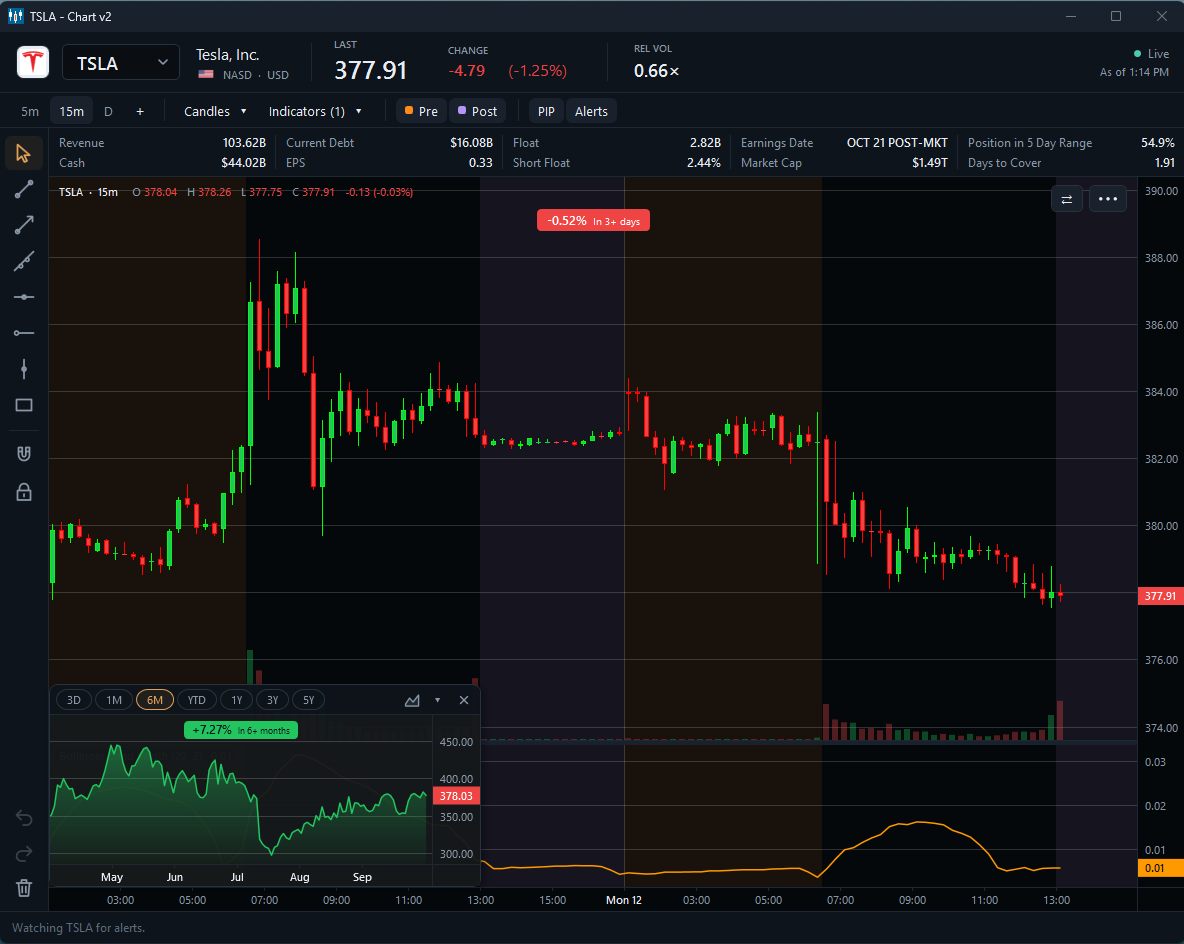
PiP puts a longer-term chart of the same stock right inside your intraday chart. You see today’s setup and the bigger trend at the same time, without switching windows. Want the bigger view? Double-click the small chart and the two charts swap places. Pick the small chart’s range with one click, from 3 days to 5 years, and it tags the stock’s % change over that span. You can read the bigger move without doing the math.
Looking for the tool that rotates new stocks onto your charts? That is Idea Surfing, a separate setting.
A chart with a second, smaller chart of the same stock embedded inside it on a different timeframe. In Trade Ideas the embedded chart sits in a corner of the main chart, so you read the trend and the current price action without switching windows.
Reading one stock on two or more timeframes before you act, for example confirming a 15-minute setup against the daily trend. A multi timeframe chart puts those views side by side; PiP puts them in one chart.
A view that shows one stock on more than one timeframe at the same time, such as 15-minute bars and daily bars. PiP builds that view into a single chart.
The PiP layout Trade Ideas describes has three main charts, each with an embedded chart, which puts six timeframes of one stock on screen.
Yes. Scroll with the mouse wheel inside the embedded chart to widen or narrow its date range. The chart labels how far the stock moved over the range you pick, and each chart pair keeps its own settings.
Yes. Web Dashboard charting includes Picture in Picture, alongside Top Lists (Screeners), Races, TreeMaps and Market Pulse. Open a free account to try it in your browser.
Idea Surfing rotates the top stocks from your scans onto your charts. With PiP, each stock arrives on every timeframe at once. See the Idea Surfing page.
Past results, including backtests, don't guarantee future results.
Free account, just an email. No card. Live access for a limited time. Ready to buy? See plans & pricing