







 TV
TV
Filter
Volume Today Filter (TV)
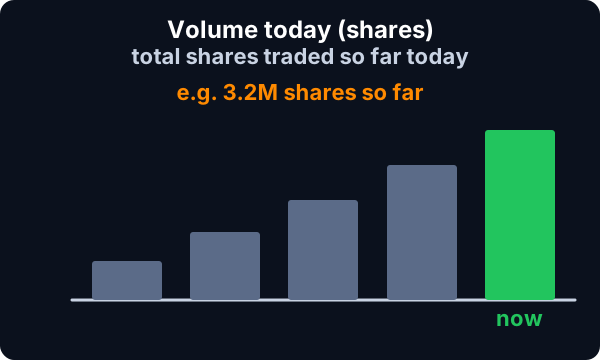
Find the most active stocks today by shares traded, including premarket volume, in real time, with Trade Ideas Streaming Alerts (Scanner) and Top Lists (Screeners). Volume Today counts the shares a stock has traded so far today, starting in the premarket session. It is a raw count, not a comparison to an average.
See the crowd arriving before the crowd does.
Free account, just an email. No card. Live access for a limited time.
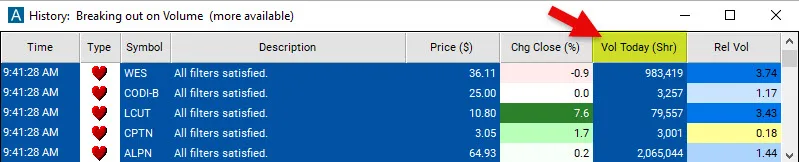
Streaming Alerts check the Volume Today (Shares) filter the moment each alert fires, and Top Lists can sort by it.
How Trade Ideas finds it: to find stocks that have already been trading at least 150k shares today, add the Volume Today Shares filter and enter 150000 in the minimum field. See Trade Ideas plans and pricing to run it live.
How the Volume Today filter works
The Volume Today Shares Filter is a relatively simple filter. This filter doesn't compare today's volume to an average, but instead displays the sheer number of shares that have been traded on a given day. It starts calculating in the premarket session. The filter can be used to assess the liquidity and trader interest in a particular security at that point in time.
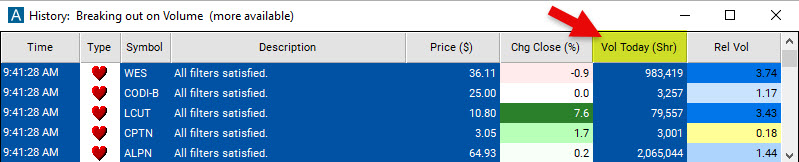
Volume Today filter settings
Activating the Volume Today Shares Filter is straightforward. You'll find its settings under the Window Specific Filters Tab in your Alert or Top List (Screener) window's Configuration Window. You can set a minimum and/or maximum value, and stocks that don't fit within your parameters are automatically excluded from your scan results.
- To find stocks that have already been trading at least 150k shares today, add the Volume Today Shares Filter to your scan and enter 150000 in the minimum field in the Window Specific Filters Tab.
- To find stocks that have not been trading more than 200 000 shares today, add the Volume Today Shares Filter to your scan and enter 200000 in the maximum field in the Window Specific Filters Tab.
- To find stocks that have been trading between 300k and 1Mil shares today, add the Volume Today Shares Filter to your scan and enter 300000 in the minimum field and enter 1000000 in the maximum field in the Window Specific Filters Tab.
Using the Volume Today Shares Filter in Trading
By monitoring the number of shares traded, traders can gain important insights and make more informed decisions. However, like any trading indicator, it's important to use volume data in combination with other indicators and analysis methods to develop a comprehensive view of the market.
Filters to combine with Volume Today
Alerts to pair with the Volume Today filter
FAQ
What are the most active stocks today?
Add the Volume Today filter (TV) to a Trade Ideas Streaming Alerts or Top List (Screener) window. To find stocks that have already been trading at least 150k shares today, add the Volume Today Shares filter and enter 150000 in the minimum field.
What is the Volume Today (Shares) filter?
Volume Today counts the shares a stock has traded so far today, starting in the premarket session. It is a raw count, not a comparison to an average.
Which stocks have the most premarket volume right now?
Use the Volume Today filter (TV) in Trade Ideas Streaming Alerts and Top Lists to find the most active stocks today by shares traded, including premarket volume. Volume Today counts the shares a stock has traded so far today, starting in the premarket session.
Does the Volume Today Shares Filter include shares traded in the premarket?
Yes, the Volume Today Shares Filter begins its calculations at the start of the premarket session. As the trading day advances and more shares are traded, the filter's value increases.
Can I customize the Volume Today Shares Filter to only see premarket volume or to only see shares traded after today's open?
The Volume Today Shares Filter cannot be set to include or exclude premarket volume. It continually calculates throughout the trading day, and starts in the early morning session.
How can I see how many shares a stock has traded in the last five minutes or in the last 30 minutes and not just today's total volume?
To see how much volume a stock has traded in a specific time period, you can create a quick custom filter with the help of our Formula Editor using one of the following data points available in our system.
v_up_1
Entering this code in the Formula Editor and saving it as a custom filter will show you the number of shares a stock has traded in the last minute.
v_up_5
Entering this code in the Formula Editor and saving it as a custom filter will show you the number of shares a stock has traded in the last 5 minutes.
v_up_10
Entering this code in the Formula Editor and saving it as a custom filter will show you the number of shares a stock has traded in the last 10 minutes.
v_up_15
Entering this code in the Formula Editor and saving it as a custom filter will show you the number of shares a stock has traded in the last 15 minutes.
v_up_30
Entering this code in the Formula Editor and saving it as a custom filter will show you the number of shares a stock has traded in the last 30 minutes.
Please note: The above time periods are fixed and cannot be customized, this means you cannot, for example check how many shares a stock has traded in the last 13 minutes by simply modifying the code. You can, however, use these custom filters just like our preset filters and enter minimum and maximum values to limit your scan results.