







 RC
RC
Filter
Range Contraction Filter (RC)
Find narrow-range stocks whose daily range has shrunk for several days in a row in real time with Trade Ideas Streaming Alerts (Scanner) and Top Lists (Screeners). Range Contraction counts consecutive days in which a stock's daily range (high minus low) was smaller than the day before. Negative values count days of range expansion.
Stocks making a run, up and down.
Free account, just an email. No card. Live access for a limited time.
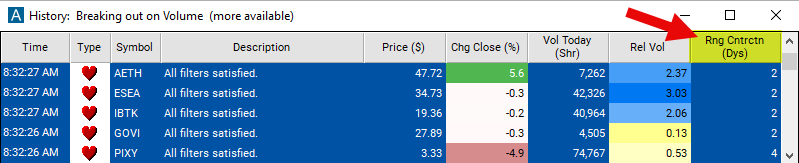
Seeing a coiled stock break out of its range as it happens helps active traders. The Range Contraction filter value changes once a day, so Streaming Alerts apply it the moment each alert fires: you see only the stocks that pass it, while they are moving.
How Trade Ideas finds it: set the min range contraction to 2 to see stocks which have had range contractions for at least 2 consecutive days. Set the max range contraction to -3 to find stocks which have had a range explosion for at least three consecutive days. See Trade Ideas plans and pricing to run it live.
How the Range Contraction filter works
Key point
Range contraction refers to a stock pattern where a stock’s trading range gets smaller every day. A stock’s trading range is the difference between the high for the day and the low for the same day. If a stock’s trading range yesterday was smaller than its range the day before yesterday, we said the stock had a range contraction. If the day before yesterday’s range was smaller than the range of the day before that, then the stock had a range contraction for two consecutive days.
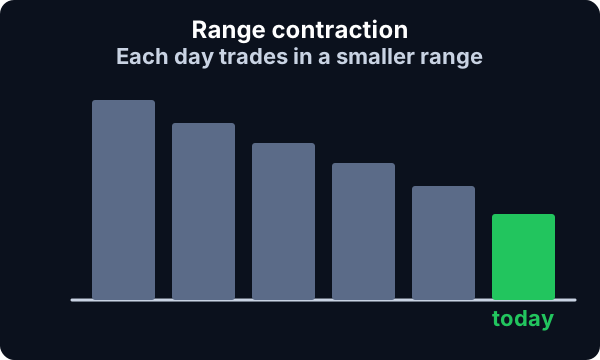
Range explosion refers to the opposite pattern. These are stocks with a range that has grown larger each consecutive day. Use negative numbers to find these patterns.
These filters always start with yesterday’s trading and work backwards. Use other filters and alerts to see what the stock is doing today. For example use the Daily highs resistance and Daily lows support alerts, with these filters, to find stock which were in a range contraction pattern but are breaking out.
Range Contraction filter settings
Settings
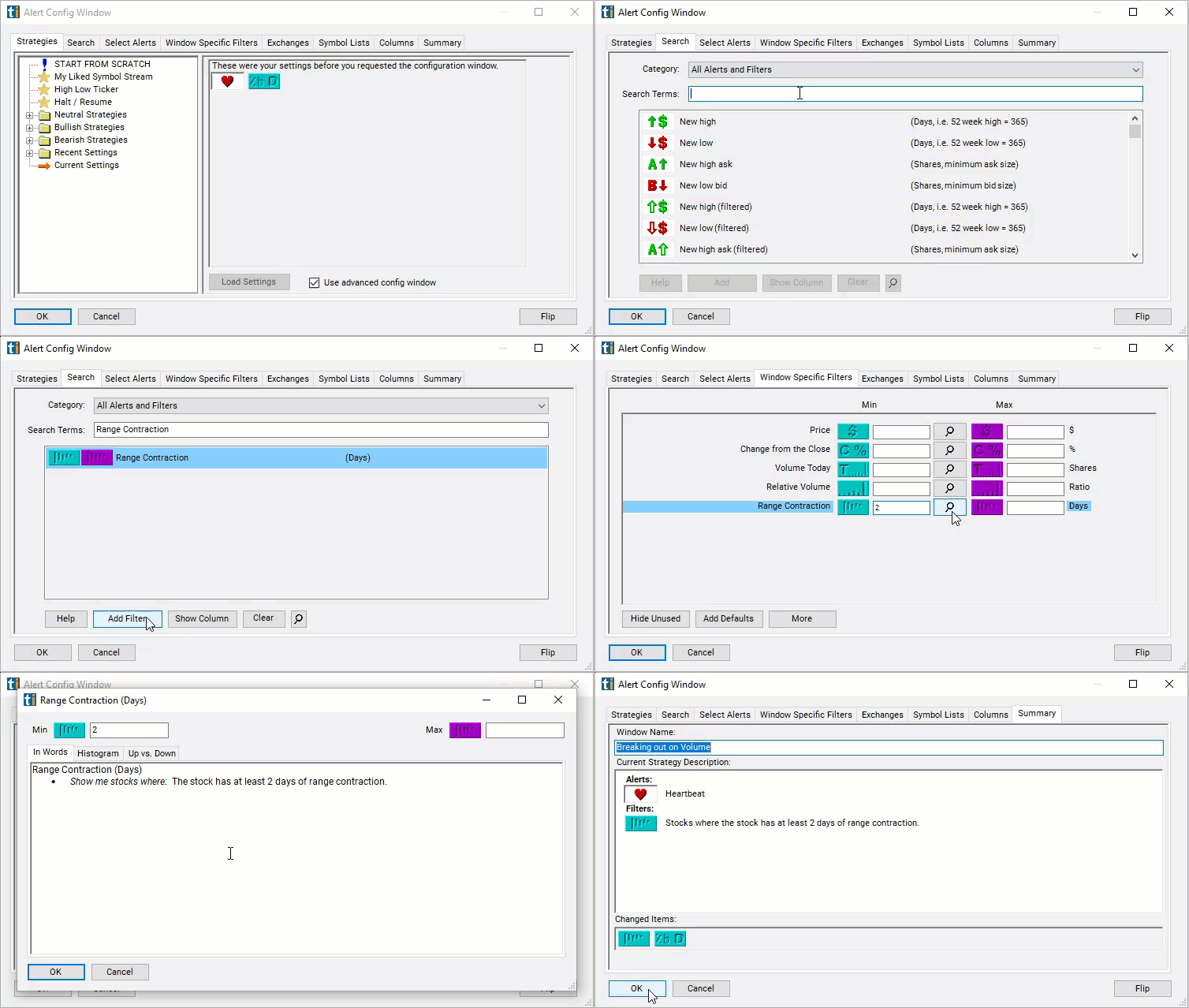
The settings of each Trade Ideas filter are defined in the Window Specific Filters Tab located in the Configuration Window of your Alert or Top List (Screener) window.
Here is how to setup the filter in your configuration window:
- Set the min range contraction to 2 to see stocks which have had range contractions for at least 2 consecutive days.
- Set the max range contraction to -3 to find stocks which have had a range explosion for at least three consecutive days.
Using the Range Contraction Filter
Several trading strategies can be employed with the Range Contraction filter. Here are a few examples:
- Breakout Trading: Enter trades when the price breaks out of the contraction phase, signaling a potential continuation of the current trend or the start of a new trend. Wait for the price to break above the upper boundary of the contraction phase (bullish breakout) or below the lower boundary (bearish breakout) before entering a long or short position, respectively. Use volume confirmation to validate the breakout.
- Volatility Expansion Trading: Anticipate an increase in volatility following a period of range contraction. Enter trades when volatility starts to expand, indicated by an increase in trading volume and price movements. Traders can use volatility indicators such as the Average True Range (ATR) or Bollinger Bands to identify potential trading opportunities.
- Range Reversion Trading: Trade the reversion to the mean when the price remains within the contracted range. Enter trades when the price approaches the boundaries of the contraction phase (upper or lower range). Take a long position near the lower boundary and a short position near the upper boundary, anticipating a pullback towards the middle of the range.
- Trend Continuation Trading: Use range contraction as a confirmation signal for trend continuation. If the price contracts within a trend, look for opportunities to enter trades in the direction of the prevailing trend once the contraction phase ends. This could involve entering long positions during bullish trends or short positions during bearish trends.
Filters to combine with Range Contraction
Alerts to pair with the Range Contraction filter
Categories
FAQ
Which stocks are in a narrow range setup right now?
Add the Range Contraction filter (RC) to a Trade Ideas Streaming Alerts or Top List (Screener) window. Set the min range contraction to 2 to see stocks which have had range contractions for at least 2 consecutive days. Set the max range contraction to -3 to find stocks which have had a range explosion for at least three consecutive days.
What is the Range Contraction filter?
Range Contraction counts consecutive days in which a stock's daily range (high minus low) was smaller than the day before. Negative values count days of range expansion.
How do I find range contraction stocks?
Use the Range Contraction filter (RC) in Trade Ideas Streaming Alerts and Top Lists to find narrow-range stocks whose daily range has shrunk for several days in a row. Range Contraction counts consecutive days in which a stock's daily range (high minus low) was smaller than the day before.