







 CHBOC
▲ Bullish
CHBOC
▲ Bullish
Streaming Alert (Scanner)
Channel Breakout (confirmed) Alert (CHBOC)
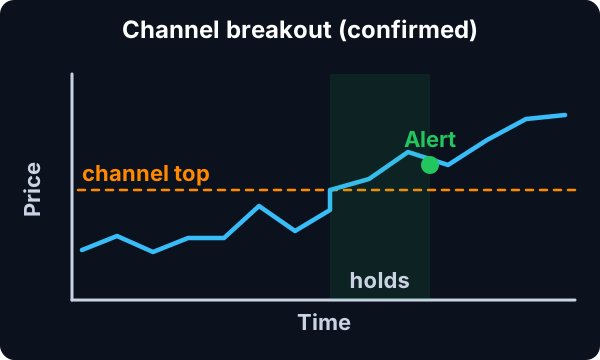
Find stocks breaking out of a consolidation channel in real time with Trade Ideas Streaming Alerts (Scanner). A confirmed channel breakout is when a stock moves directly from consolidating to running up, with volume and price action confirming it, on about a 15 minute scale.
Know when price crosses your line.
Free account, just an email. No card. Live access for a limited time.
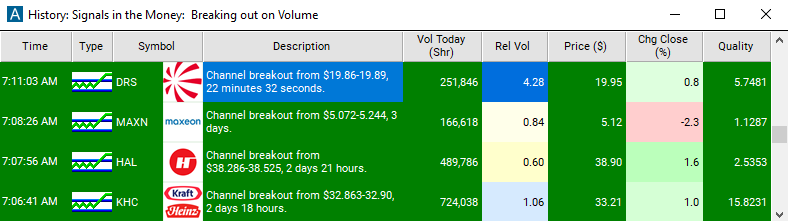
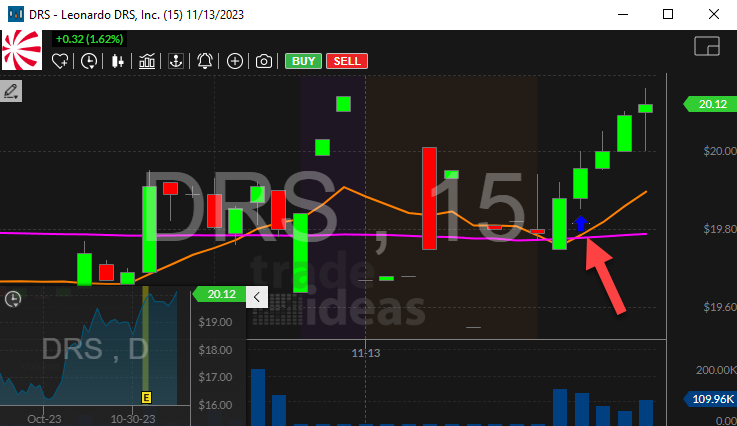
Streaming Alerts push each Channel Breakout (confirmed) alert as soon as price and volume confirm it.
How Trade Ideas finds it: by default, the channel breakout (confirmed) alert will appear when a stock transitions directly from a consolidating state to a running state. See Trade Ideas plans and pricing to run it live.
How the Channel Breakout (confirmed) alert works
A volume confirmed channel breakout alert occurs when a stock transitions directly from a consolidating state to a running state. See the definitions of the consolidation alert, and the running up (confirmed) alert for more details. A consolidation does not always end in a channel breakout alert.
Key point
If the stock price moves just slightly outside of the range of the consolidation, the software may just increase the size of the channel. In this case another consolidation alert will eventually occur, but it will be labeled as "decaying". Alternatively, the stock price can move far enough outside of the channel that the stock in no longer consolidating. If it does so slowly enough, no alerts will occur.
These alerts only occur when the stock price moves quickly enough to be interesting. These alerts require a certain combination of volume and price action for confirmation. This is required by the way we report consolidations. The top and the bottom of the channel are based on the price of most of the prints, but some prints will be outside of the channel.
Keep in mind
Therefore, an alert does not occur every time a single print is outside of the channel. An alert only occurs when there is a recognizable pattern of price, time, and volume. In the past, "channel breakout" appeared in the description of running up (confirmed) alerts. Now this alert has its own alert type, so a user may enable or disable these separately from the running alerts.
Default settings
By default, the channel breakout (confirmed) alert will appear when a stock transitions directly from a consolidating state to a running state. These alerts require a certain combination of volume and price action for confirmation.
Custom settings
Trader tip
For 'Channel Breakout (confirmed)' alerts, you have the option to use an alert specific filter. This filter is located immediately to the right of the corresponding alert and is always optional. You can decide to leave it blank if you want to receive more alerts, or you can fill it in to restrict the number of alerts you receive.
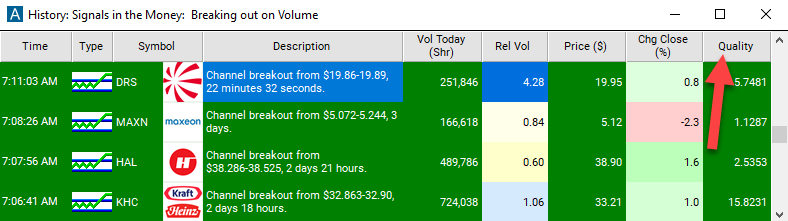
This filter allows you to specify the quality of the alert. When you set a higher number for this filter, you are telling the alerts server to display only alerts that meet a higher quality standard, resulting in fewer alerts being shown.
Settings
A volume confirmed channel breakout is a special case of a volume confirmed running up alert. This filter applies the same to a channel breakout as it does to any other running alert. When setting an alert for 'Channel Breakout (confirmed)', the user can filter the alerts based on how exceptional the chart pattern is. This value is not based on the size of a price move, but the speed and consistency of the move.
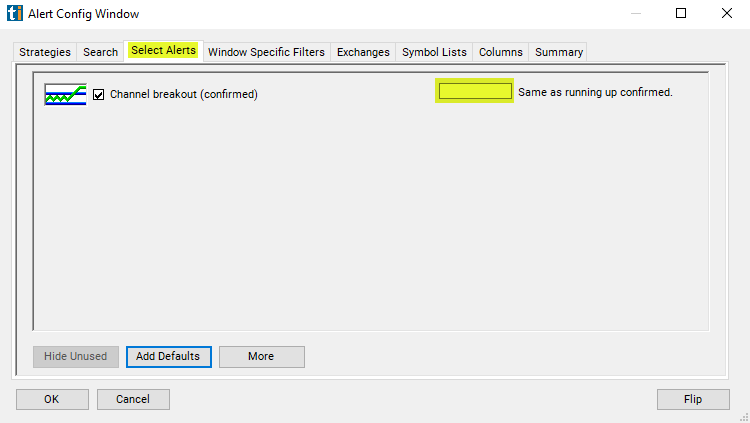
A value of 1.0 is the minimum that the alerts server ever reports. Leaving this field blank, or setting it to 1.0, shows all alerts. Alerts with values of 5.0 or higher as marked as moving "briskly" in the description field. There is no upper limit to this value, but very few alerts have a value above 10.0.
What the alert shows you
Key point
The description of your scan will tell you at what price the breakout occured.
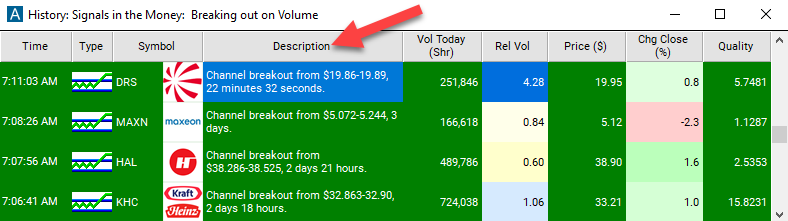
Using Trade Ideas proprietary algorithm and referencing a stocks historical baseline for movement, the quality value can start at 1 and have no maximum value. A value of 4 shows the most extraordinary 1/3 of the alerts. A value of 10 ensures only the top 1% of the alerts will be triggered.
Related alerts
Filters to pair with the Channel Breakout (confirmed) alert
Categories
FAQ
Find stocks breaking out of a range right now?
Turn on the Channel Breakout (confirmed) alert (CHBOC) in Trade Ideas Streaming Alerts. By default, the channel breakout (confirmed) alert will appear when a stock transitions directly from a consolidating state to a running state.
What is the Channel Breakout (confirmed) alert?
A confirmed channel breakout is when a stock moves directly from consolidating to running up, with volume and price action confirming it, on about a 15 minute scale.
How do I see fewer, higher-quality Channel Breakout (confirmed) alerts?
Use the optional alert-specific filter immediately to the right of the alert. A higher number tells the alerts server to show only higher-quality alerts, so fewer appear. Leave it blank to see more.