







 PDIMDI
Filter
Directional Indicator Filter (PDIMDI)
Find stocks where +DI is above -DI (trending up) or below it (trending down) in real time with Trade Ideas Streaming Alerts (Scanner) and Top Lists (Screeners). The Directional Indicator filter compares the Positive Directional Indicator (+DI) with the Negative Directional Indicator (-DI). Positive values mean +DI is higher, so the stock is moving up.
See the cross when it happens, not on tomorrow’s chart.
Free account, just an email. No card. Live access for a limited time.
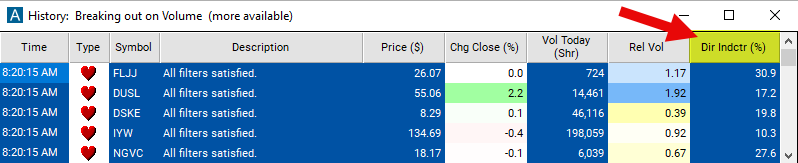
Seeing a directional trend build as it happens helps active traders. The Directional Indicator (+DI vs -DI) filter value changes once a day, so Streaming Alerts apply it the moment each alert fires: you see only the stocks that pass it, while they are moving.
How Trade Ideas finds it: to find stocks that are going up, set the minimum value for this filter to 0. To find stocks that are going down, set the maximum value for this filter to 0. See Trade Ideas plans and pricing to run it live.
How the Directional Indicator filter works
The Directional Indicator (DI) filter is a tool used in technical analysis for evaluating the direction of a given stock or market's price movement. It includes two primary components: the Positive Directional Indicator (+DI) and the Negative Directional Indicator (-DI). Here's a detailed explanation of how it works and how it's used in stock trading:
Components of the Directional Indicator Filter
- Positive Directional Indicator (+DI): Measures the presence of an upward price movement and its strength relative to previous periods. It's calculated based on the difference between the current high and the previous high, indicating bullish pressure when it's increasing.
- Negative Directional Indicator (-DI): Measures the presence of a downward price movement and its strength relative to previous periods. It's calculated from the difference between the previous low and the current low, indicating bearish pressure when it's increasing.
How It WorksCalculation: The +DI and -DI are derived from the Directional Movement Index (DMI), which itself is part of the calculations involving the True Range and the directional movements (+DM and -DM). The +DI and -DI are then smoothed over a specified period and normalized by dividing them by the Average True Range (ATR), presenting them as a percentage.
Key point
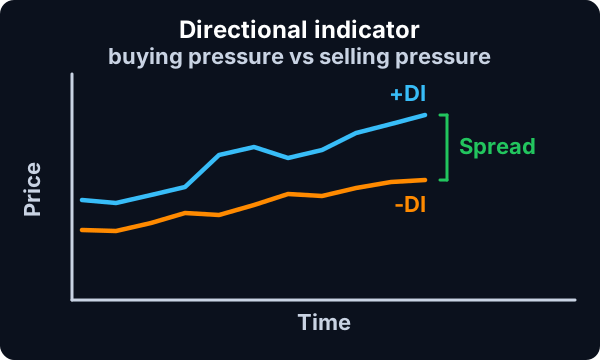
Interpretation: When the +DI is above the -DI, it suggests that buying pressure is stronger and the market could be in an uptrend.
Conversely, when the -DI is above the +DI, selling pressure is dominant, indicating a potential downtrend. The greater the distance between the +DI and -DI, the stronger the trend. A crossover of these lines can signal potential buying or selling opportunities.
This filter can be anywhere between -100 and 100.
Directional Indicator filter settings
Settings
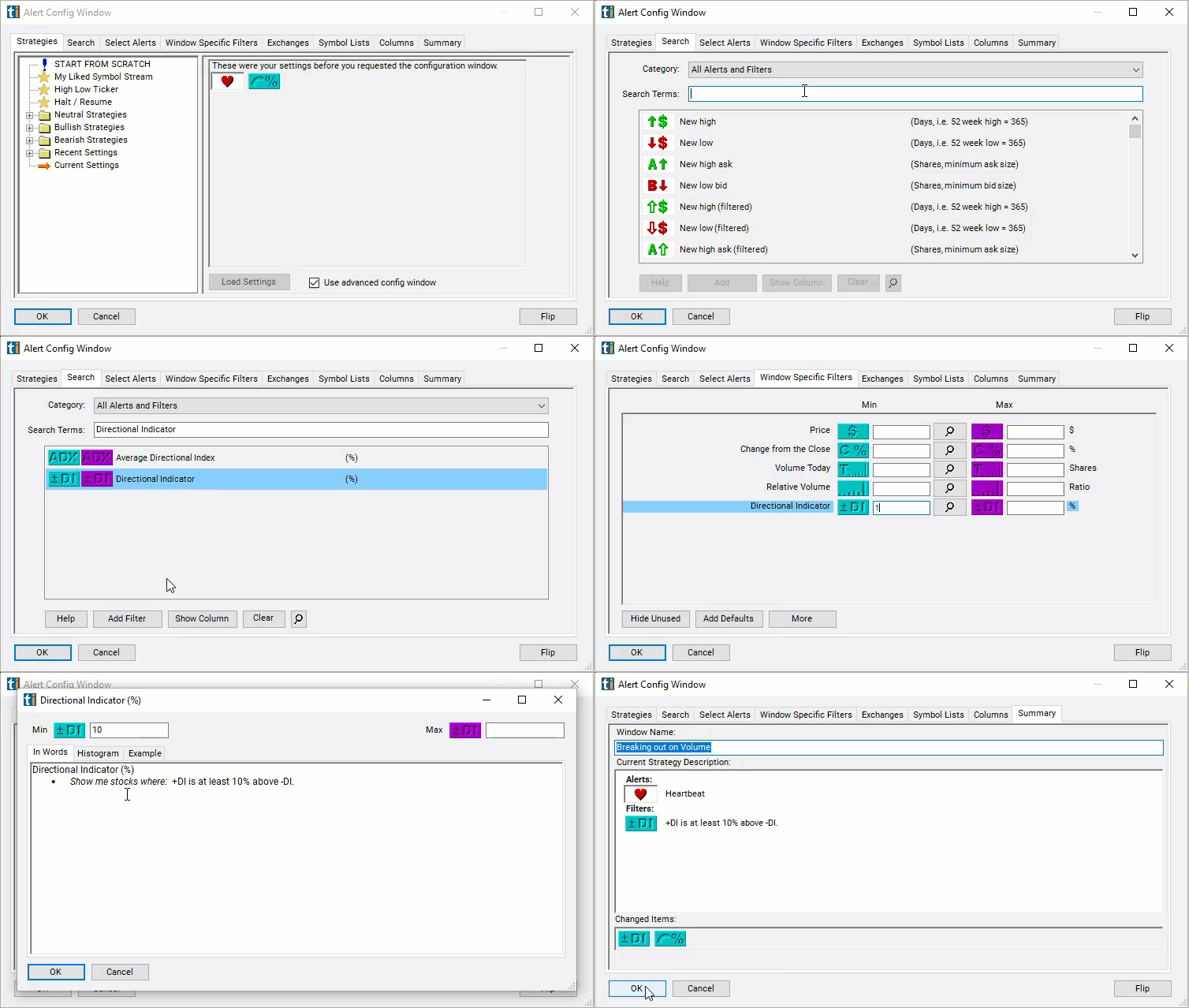
The settings of each Trade Ideas filter are defined in the Window Specific Filters Tab located in the Configuration Window of your Alert or Top List (Screener) window.
Here is how to setup the filter in your configuration window:
- To find stocks that are going up, set the minimum value for this filter to 0.
- To find stocks that are going down, set the maximum value for this filter to 0.
- To find stocks where +DI is noticeably higher than -DI, set the min value to 10.
- To find stocks where +DI is noticeably lower than -DI, set the max value to -10.
Using the Directional Indicator Filter
Several trading strategies can be employed with the Directional Indicator filter. Here are a few examples:
- DI Crossover Strategy: Buy when the +DI crosses above the -DI, indicating potential upward momentum. Conversely, sell or short when the -DI crosses above the +DI, signaling potential downward momentum.
- Trend Strength Confirmation with ADX: Use the ADX in conjunction with the +DI and -DI to confirm the strength of the trend before making a trade. Consider trading in the direction indicated by the DI crossover only when the ADX is above a certain level (e.g., 20 or 25), which signifies a strong trend.
- DI Divergence Strategy: Look for divergence between the DI lines and price. For example, if price makes a new high but the +DI does not, it may indicate weakening upward momentum and a potential reversal.
Filters to combine with Directional Indicator
Alerts to pair with the Directional Indicator filter
Categories
FAQ
Which stocks have +DI above -DI?
Add the Directional Indicator filter (PDIMDI) to a Trade Ideas Streaming Alerts or Top List (Screener) window. To find stocks that are going up, set the minimum value for this filter to 0. To find stocks that are going down, set the maximum value for this filter to 0.
What is the Directional Indicator (+DI vs -DI) filter?
The Directional Indicator filter compares the Positive Directional Indicator (+DI) with the Negative Directional Indicator (-DI). Positive values mean +DI is higher, so the stock is moving up.
How do I use DMI to find trending stocks?
Use the Directional Indicator filter (PDIMDI) in Trade Ideas Streaming Alerts and Top Lists to find stocks where +DI is above -DI (trending up) or below it (trending down). The Directional Indicator filter compares the Positive Directional Indicator (+DI) with the Negative Directional Indicator (-DI).