







 LowTOD10Med
Filter
Time To 10-Day Median Low Filter (LowTOD10Med)
Find stocks approaching the time of day they usually make their daily low in real time with Trade Ideas Streaming Alerts (Scanner) and Top Lists (Screeners). The Time to Median Low (10 day) filter measures, in minutes, how close the current time is to the median time the stock made its daily low over the last 10 trading days. Positive means that time is still ahead.
See the breakout when it prints, not after.
Free account, just an email. No card. Live access for a limited time.
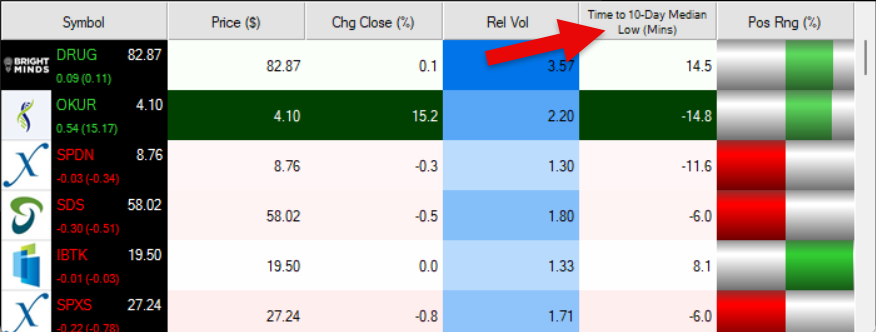
Seeing a stock reach its usual low-of-day window as it happens helps active traders. The Time to Median Low (10 day) filter value changes once a day, so Streaming Alerts apply it the moment each alert fires: you see only the stocks that pass it, while they are moving.
How Trade Ideas finds it: setting Min to -15 and Max to 15 will return stocks trading within 15 minutes before or after their median 10 day low time. See Trade Ideas plans and pricing to run it live.
How the Time to Median Low (10 day) filter works
The "Time to Median Low (10 day)" filter measures how close the current time is to the median time a stock typically makes its daily low over the last 10 trading days.
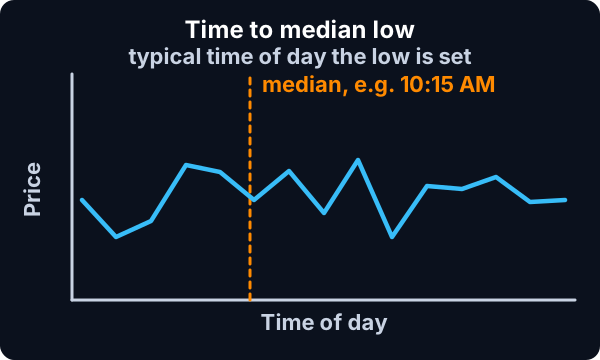
A positive value means the stock’s typical low time is still ahead. A negative value means the stock’s typical low time has already passed.
You can use this filter to identify stocks that are approaching or have recently passed the time they historically tend to make daily lows.
Time to Median Low (10 day) filter settings
Settings
The settings of each Trade Ideas filter are defined in the Window Specific Filters Tab located in the Configuration Window of your Alert or Top List (Screener) window.
Here is how to setup the filter in your configuration window:
- Setting Min to -15 and Max to 15 will return stocks trading within 15 minutes before or after their median 10 day low time.
- Tighter ranges will return fewer but more precise alerts.
- Wider ranges will return more alerts, including stocks approaching or recently passing their median low time.
These filters work best during regular trading hours and update in real time.
Filters to combine with Time to Median Low (10 day)
Alerts to pair with the Time to Median Low (10 day) filter
Categories
FAQ
What time of day does a stock usually make its low?
Add the Time to Median Low (10 day) filter (LowTOD10Med) to a Trade Ideas Streaming Alerts or Top List (Screener) window. Setting Min to -15 and Max to 15 will return stocks trading within 15 minutes before or after their median 10 day low time.
What is the Time to Median Low (10 day) filter?
The Time to Median Low (10 day) filter measures, in minutes, how close the current time is to the median time the stock made its daily low over the last 10 trading days. Positive means that time is still ahead.
How do I find stocks near their usual low time?
Use the Time to Median Low (10 day) filter (LowTOD10Med) in Trade Ideas Streaming Alerts and Top Lists to find stocks approaching the time of day they usually make their daily low. The Time to Median Low (10 day) filter measures, in minutes, how close the current time is to the median time the stock made its daily low over the last 10 trading days.